Wednesday, February 15, 2017

Plotting 3D graphs using Python and Tellurium

Originally Posted on  by hsauro

As an example I wanted to show how one could plot a 3D phase plot. A great example to use for this is the Lorenz Attractor. This system is interesting because it displays chaotic behavior. The differential equations for the system are given by the following three:
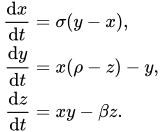
{\begin{aligned}{\frac {\mathrm {d} x}{\mathrm {d} t}}&=\sigma (y-x),\\{\frac {\mathrm {d} y}{\mathrm {d} t}}&=x(\rho -z)-y,\\{\frac {\mathrm {d} z}{\mathrm {d} t}}&=xy-\beta z.\end{aligned}}

Different values for the parameters, sigma, rho and beta, lead to different behaviors. The Python script below that uses Tellurium plots a 3D phase plot:

# The Lorenz Model
 
# The Lorenz system of equations is the classic set of
# equations which exhibit chaotic dynamics. The equations
# represent a highly simplified model of 2D thermal
# convection known as Rayleigh-Benard convection;
 
# The three variables, x, y and z represent the
# convective overturning, the horizontal temperature
# and vertical temperature variation respectively;
 
## The parameters a, b and c represent approximately
# the energy losses within the fluid due to viscosity,
# the temperature difference between the two plates
# which separate the fluid and the ratio of the vertical
# height of the fluid layer to the horizontal extent
# of the convective rolls respectively;
import tellurium as te
import roadrunner
from mpl_toolkits.mplot3d import Axes3D
import matplotlib as mpl
import matplotlib.pyplot as plt
import numpy as np
 
r = te.loada ('''
// Define the model in terms of three differential equations;
$s -> x; -a*(x - y);
$s -> y; -x*z + b*x - y;
$s -> z; x*y - c*z;
 
a = 10; b = 28; c = 2.67;
''')
 
# Uncomment/comment the following lines to obtain behaviour you wish to observe;
 
# Non-chaotic oscillations;
#r.x = 5.43027; r.y = 26.74167; r.z = 46.0098;
#r.a = 4; r.b = 91.9; r.c = 2.67;
 
# Single oscillation;
#r.x = 32.82341; r.y = -44.84651; r.z = 258.02389;
#r.a = 4; r.b = 191.9; r.x = 2.67;
 
# Stable steady-state;
#r.x = 0.1; r.y = 0.1; r.z = 0.1;
#r.a = 10; r.b = 10; r.c = 2.67;
 
# Chaos
r.x = 0.96259; r.y = 2.07272; r.z = 18.65888;
 
m = r.simulate (0, 40, 3000, ['x', 'y', 'z']);
 
fig = plt.figure(figsize=(8,8))
ax = fig.gca(projection='3d')
 
#theta = np.linspace(-4 * np.pi, 4 * np.pi, 100)
ax.plot(m[:,0], m[:,1], m[:,2], label='Lorenz Attractor')
ax.legend()
 
plt.show()


Wednesday, November 30, 2016

How do I run a stochastic simulation using Tellurium/libRoadRunner?

 In this post I will show you how to run a stochastic simulation using our Tellurium application. Tellurium is a set of libraries that can be used via Python. One of those libraries is libRoadRunner which is our very fast simulator. It can simulate both stochastic and deterministic models. Let's illustrate a stochastic simulation using the following simple model:

import tellurium as te
import numpy as np

r = te.loada('''
    J1: S1 -> S2;  k1*S1;
    J2: S2 -> S3;  k2*S2
    J3: S3 -> S4;  k3*S3;

    k1 = 0.1; k2 = 0.5; k3 = 0.5;
    S1 = 100;
''')

We've set up the number of initial molecules of S1 to be 100 molecules. The easiest way to run a stochastic simulation is to call the gillespie method on roadrunner. This is shown in the code below:

m = r.gillespie (0, 40, steps=100)
r.plot()

Running this by clicking on the green button in the tool bar will give you the plot:


What if you wanted to run a lot of gillespie simulations to get an idea of the distribution of trajectories? TO do that just just need to repeat the simulation many times and plot all the results on the same graph:

import tellurium as te
import numpy as np

r = te.loada('''
    J1: S1 -> S2; k1*S1;
    J2: S2 -> S3; k2*S2
    J3: S3 -> S4; k3*S3;

    k1 = 0.1; k2 = 0.5; k3 = 0.5;
    S1 = 100;
''')

# run repeated simulation
numSimulations = 50
points = 101
for k in range(numSimulations ):
    r.resetToOrigin()
    s = r.gillespie(0, 50)
    # No legend, do not show
    r.plot(s, show=False, loc=None, alpha=0.4, linewidth=1.0)

This script will yield the plot:


We can do one other thing and compute the average trajectory and overlay the plot with the average line. The one thing we have to watch out for is that we must set the integrator property variable_step_size = False to false. This will ensure that time points are equally spaced and that all trajectories end at the same point in time.

import tellurium as te
import numpy as np

r = te.loada('''
    J1: S1 -> S2; k1*S1;
    J2: S2 -> S3; k2*S2
    J3: S3 -> S4; k3*S3;

    k1 = 0.1; k2 = 0.5; k3 = 0.5;
    S1 = 100;
''')

# run repeated simulation
numSimulations = 50
#points = 101
# Set the physical size of the plot (units are in inches)
plt.figure(figsize=(10,5))
r.setIntegrator ('gillespie')
# Make sure we do this so that all trajectories 
# are the same length and spacings
r.getIntegrator().variable_step_size = False
s_sum = np.array(0.)
for k in range(numSimulations):
    r.resetToOrigin()
    s = r.simulate(0, 100, steps=50)
    s_sum = np.add (s_sum, s)
    # no legend, do not show
    r.plot(s, show=False, loc=None, alpha=0.4, linewidth=1.0)

# add mean curve, legend, show everything and set labels, titels, ...
s_mean = s_sum/numSimulations
r.plot(s_mean, loc='upper right', show=True, linewidth=3.0,
       title="Stochastic simulation", xlabel="time", 
       ylabel="concentration", grid=True); 

This will give us the following plot: